Public note
Pascal Editor Review: A Simple Look at the Free Browser-Based 3D Design Platform
Pascal Editor is a browser-based, open-source 3D design tool for creating and sharing interactive floor plans and room layouts in real-time using modern web technologies like WebGPU.
What is Pascal Editor?
Pascal Editor is an open-source 3D building editor that runs in the browser. The project repository describes it as “a 3D building editor built with React Three Fiber and WebGPU,” and its public site presents it as a browser-native spatial design tool for drafting floor plans, modeling rooms, and sharing interactive 3D layouts.
That matters because most people still think of architectural or 3D design software as something large, expensive, and difficult to install. Pascal Editor points in a different direction. It suggests that a modern design tool can be:
- browser-based
- visual
- interactive
- fast
- easier to approach than traditional CAD software
Who is it for?
For a non-developer audience, Pascal Editor is most relevant to:
- people curious about the future of browser software
- IT enthusiasts who want to see what WebGPU can do
- homeowners planning spaces
- interior design hobbyists
- real estate teams that want better visual presentations
- anyone interested in the shift from desktop software to web apps
In other words, Pascal Editor is not only interesting because of what it does. It is interesting because it shows where software is going.
How does it work?
At a high level, Pascal Editor works like a web-based 3D building workspace.
A beginner-friendly way to think about it is this:
- You open the tool in your browser.
- You sketch a floor plan using walls and room boundaries.
- You add design elements such as doors, windows, and furniture.
- The system renders everything in interactive 3D in real time.
- You adjust, undo, refine, and share the result.
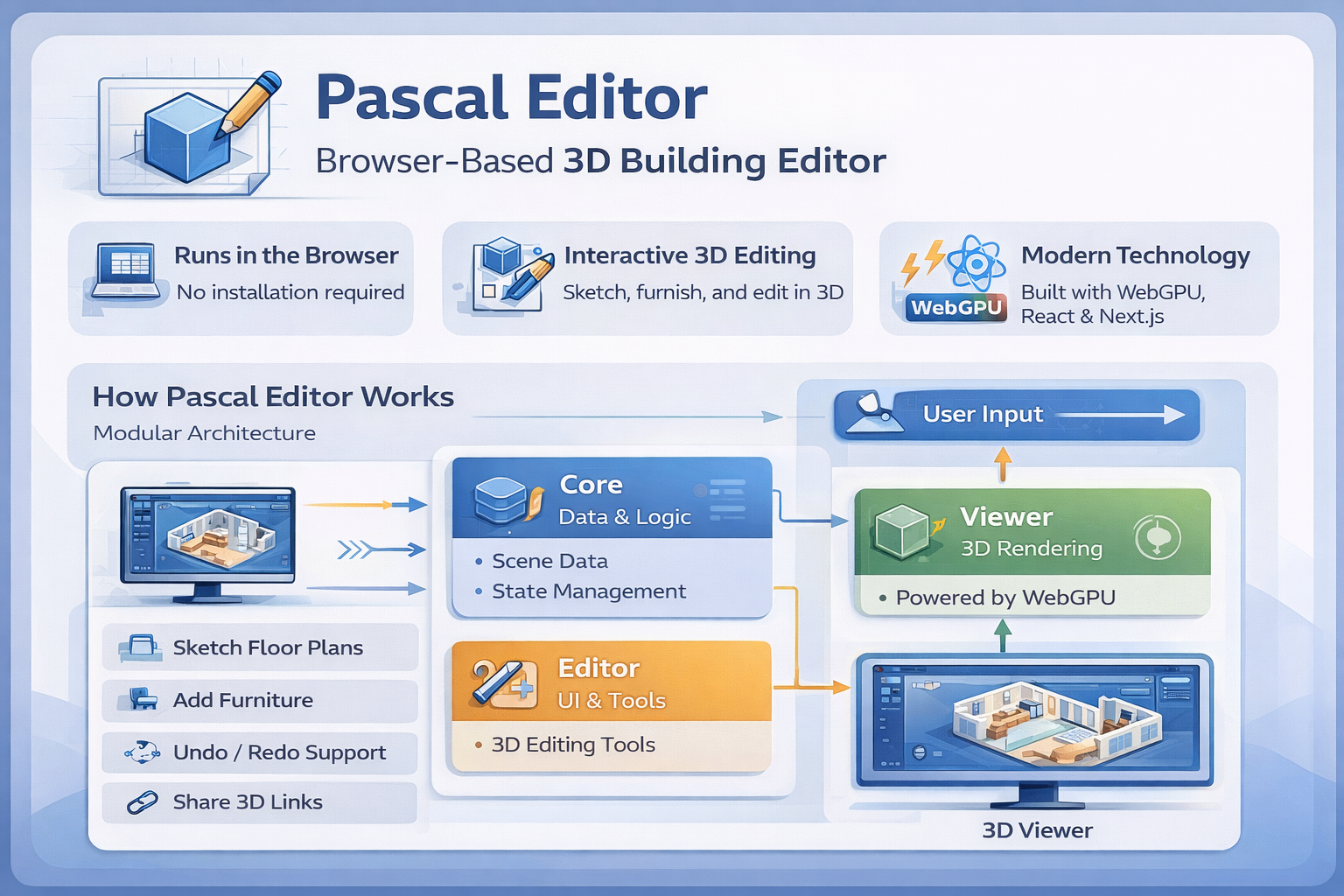
Behind the scenes, the GitHub repository shows that the project is organized into three main layers:
- core for scene data and logic
- viewer for 3D rendering
- editor for interface tools and interactions
This structure matters even for non-developers because it explains why the project feels modern. It is not a random demo. It is organized like a serious product.
The project also uses a node-based scene system. In plain English, that means every important thing in the design, such as a site, building, level, wall, slab, roof, zone, or item, is treated as a structured object the system can understand and update. That is how Pascal Editor can support editing actions like drawing walls, switching views, and updating spaces without rebuilding everything from scratch.
Another important idea is WebGPU. You do not need to know the technical details to understand the benefit: WebGPU gives browser apps much faster access to graphics hardware, which helps Pascal Editor render 3D scenes smoothly and feel closer to a native desktop application.
Key Features
- Runs in the browser
This is one of the biggest selling points. Pascal Editor’s public site emphasizes that there are no heavy downloads or complicated installations for the online experience. For ordinary users, that lowers the barrier to entry.
- 3D floor plan and room design
The tool is built for spatial design, not just abstract 3D graphics. You can sketch layouts, build rooms, and turn flat ideas into navigable 3D scenes.
- Real-time rendering with WebGPU
The project is built on WebGPU and React Three Fiber. Why does that matter? Because it gives the editor a modern, responsive feel and helps it handle interactive 3D work inside a browser.
- Wall, zone, slab, and item tools
The repository shows support for walls, zones, slabs, ceilings, roofs, and placeable items. For users, this means the tool is designed around actual building structure rather than generic shapes.
- Undo and editing safety
The official Pascal Editor site highlights an “infinite undo” experience, while the repository shows persisted state with undo/redo support. That matters because design work is experimental. People need freedom to try ideas without fear of ruining the whole project.
- Shareable interactive links
One of the most practical user-facing benefits is the ability to generate a shareable web link. That is useful for clients, collaborators, or even friends reviewing a room layout.
- Open-source foundation
Since the core project is open source, Pascal Editor is not just a closed commercial product. It also represents a broader open ecosystem, which matters to IT readers who care about transparency, adaptability, and community-driven innovation.
Pros and Cons
Pros
- Easy to understand at a high level, even for non-developers
- Browser-based experience reduces setup friction
- Real-time 3D makes layouts more intuitive than static plans
- Open-source roots make it more transparent than many closed design platforms
- Good fit for the growing trend of web-native creative tools
- Strong “show, don’t tell” value for anyone curious about WebGPU and modern browser apps
Cons
- It is still an emerging project, not a decades-old industry standard
- Advanced professionals may still need deeper CAD or BIM features
- Browser-based 3D depends on modern hardware and browser support
- Some people may expect a full enterprise architecture suite, which is not the best way to understand this project
- Because it is modern and ambitious, the experience may evolve quickly
The honest way to position Pascal Editor is this: it is not trying to replace every professional desktop tool overnight. Instead, it shows how much of that experience can now move into the browser.
How to use Pascal Editor (Step-by-step)
For a beginner or non-developer, the easiest way to understand Pascal Editor is to think in terms of a practical workflow.
Step 1: Open the editor
The public Pascal Editor site presents the experience as browser-native. That means you begin by opening the workspace in a browser instead of installing a heavy desktop package.
Step 2: Sketch the basic floor plan
Use the wall tool to trace the outline of a room or building. This is where Pascal Editor starts to feel approachable: you are not typing commands, you are visually shaping space.
Step 3: Add structure and rooms
From there, you can define spatial elements such as walls, levels, and zones. This makes the project useful for more than just rough 3D doodles.
Step 4: Furnish and refine
The public site highlights adding doors, windows, and furniture. This is where the tool becomes much more understandable to non-technical users. You stop looking at a framework and start seeing a place.
Step 5: Review the design in 3D
Because the experience is rendered in real time, you can inspect the space visually and get a better feel for layout, scale, and flow than you would from a flat floor plan alone.
Step 6: Undo, revise, and experiment
One of the biggest benefits of a digital design tool is that nothing has to be permanent. Pascal Editor encourages trial and error, which is exactly what beginners need.
Step 7: Share the result
If you want feedback, presentation value, or collaboration, the platform’s shareable link concept becomes important. Instead of exporting static files, you can let other people explore the 3D result interactively.
Use Cases
1. Home renovation planning
A homeowner can sketch a room, experiment with layouts, and understand the space visually before spending money in the real world.
2. Interior design mockups
A designer can use it to test furniture placement and room flow in a faster, more flexible way than static drawings.
3. Real estate presentation
Interactive 3D walkthroughs can help listings stand out more than plain photos or flat plans.
4. IT trend exploration
For tech-curious readers, Pascal Editor is a useful example of the move toward browser-native professional software. It shows that the browser is becoming a serious platform for creative and spatial work.
5. Education and demos
Because it is visual and web-based, Pascal Editor can also help explain modern web graphics, interactive design systems, and the business value of WebGPU-powered applications.
Comparison
Pascal Editor is best understood by comparing it with two categories of tools.
Pascal Editor vs traditional desktop CAD
Traditional CAD software is often powerful, but it can also be expensive, complex, and intimidating for beginners. Pascal Editor’s public positioning is almost the opposite: fast access, browser delivery, easier experimentation, and interactive sharing.
That does not mean Pascal Editor is automatically “better” than every desktop tool. It means it serves a different search intent. If someone wants a simpler, more approachable entry point into 3D space planning, Pascal Editor is easier to understand than a giant professional suite.
Pascal Editor vs simple room-planning apps
On the other side, Pascal Editor also appears more technically ambitious than many lightweight room planners because it is built on a serious open-source architecture, real-time rendering, and a structured scene system.
So the best way to frame it is this:
- simpler and more approachable than many traditional CAD tools
- more modern and technically serious than a basic room mockup app
That middle position is exactly what makes it interesting for SEO and for general IT readers.
FAQ
What is Pascal Editor used for?
Pascal Editor is used for browser-based 3D building and room design, including floor planning, room modeling, furnishing, and interactive sharing.
Is Pascal Editor for non-developers?
Yes. Even though it is built on advanced web technology, the public experience is clearly aimed at people who want to design spaces visually, not only developers.
Is Pascal Editor free?
The public site says the core building tools are free, and the GitHub project is open source.
Do I need to install Pascal Editor?
The public site emphasizes a browser-based experience with no heavy downloads for the online workspace.
What makes Pascal Editor different from traditional CAD software?
It focuses on browser access, faster learning, interactive 3D, and easier sharing rather than the full complexity of older enterprise design suites.
Why is Pascal Editor interesting for people in IT?
Because it shows how advanced software categories that once belonged to desktop applications are moving into the browser through technologies like WebGPU.
Conclusion
Pascal Editor is a strong example of where modern software is heading.
For non-developers, the story is simple: this is a browser-based 3D building tool that makes spatial design more accessible, more visual, and easier to share. For people interested in IT, the bigger story is even more important. Pascal Editor shows that the browser is becoming a serious platform for professional-grade creative software.
That is the real reason this project matters for SEO and for readers. It is not only about designing rooms. It is about the future of software itself: faster, lighter, more visual, and available from almost anywhere.
If you want a project that helps explain modern web technology to ordinary readers, Pascal Editor is an excellent case study.
External References
- GitHub Repository: https://github.com/pascalorg/editor
- Pascal Editor Online: https://pascaleditor.org/
- WebGPU Specification: https://www.w3.org/TR/webgpu/