Public note
Microsoft MarkItDown Turns Documents Into LLM-Ready Markdown, and That Is Exactly Why Developers Care
Microsoft's open-source MarkItDown project converts various file types into Markdown, preserving structure needed for AI processing while reducing preprocessing complexity.
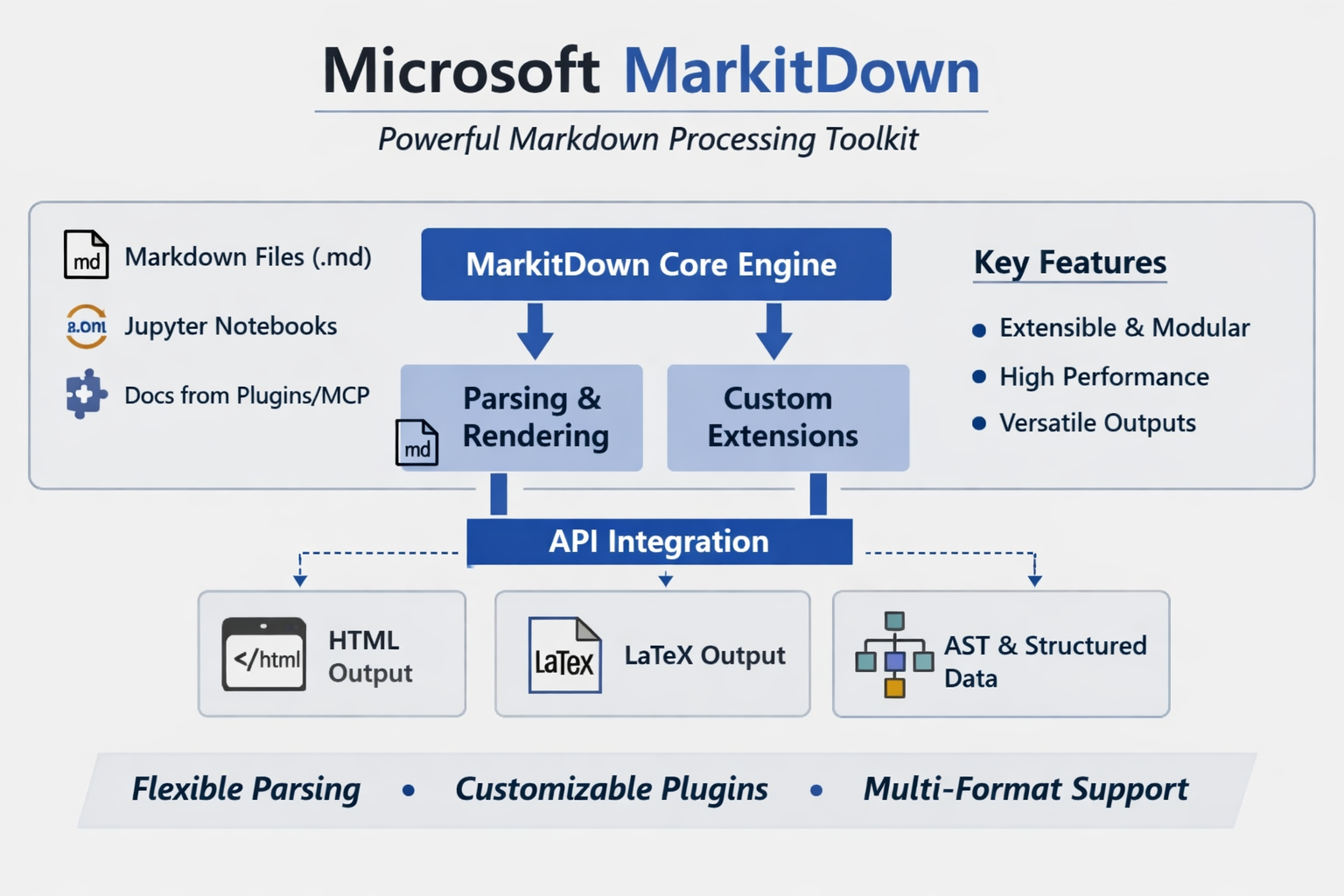
Subheadline
Microsoft’s open-source MarkItDown project is not trying to be a polished document viewer. It is aiming at a more practical problem for the AI era: converting messy real-world files into structured Markdown that language models can digest more reliably.
Lead
As generative AI systems move from chat demos to production workflows, one bottleneck keeps reappearing: documents are everywhere, but usable text is not. PDFs bury headings inside layout metadata, slide decks scatter meaning across text boxes, and spreadsheets often lose their structure when flattened into plain text. Microsoft’s MarkItDown is designed as an answer to that ingestion problem.
The project, published as an open-source Python package and CLI, converts a wide range of files into Markdown rather than raw extracted text. That choice is central to its pitch. Markdown preserves sections, lists, tables, and links in a lightweight format that is easier for downstream retrieval, indexing, summarization, and agent workflows to consume. In other words, MarkItDown is less about “document conversion” in the traditional office-software sense and more about preparing content for LLM pipelines.
At a Glance
- MarkItDown is an open-source Microsoft project for converting files into Markdown for LLM and text-analysis workflows.
- It supports a broad set of inputs, including PDF, Word, PowerPoint, Excel, images, audio, HTML, ZIP archives, EPUB, and YouTube URLs.
- The package now uses optional dependency groups, so developers can install only the converters they need instead of a full bundle.
- A plugin architecture allows third-party extensions, including OCR-oriented workflows built on vision models.
- The current PyPI release is 0.1.5, published on February 20, 2026.
- The project also now offers an MCP server, extending its role from utility library to agent-era infrastructure.
What Happened
MarkItDown has evolved from a handy file-to-Markdown converter into a broader ingestion layer for AI applications. The repository describes it as a lightweight Python utility for converting various files to Markdown “for use with LLMs and related text analysis pipelines,” explicitly positioning it closer to extraction tools like Textract than to high-fidelity publishing software.
That distinction matters. The project does not promise perfect visual fidelity, and it says so plainly. Instead, it emphasizes preserving meaningful structure — headings, bullet lists, tables, and links — because those are the elements that improve retrieval quality and make model context more coherent.
The biggest architectural step came with the 0.1.0 line, which introduced a plugin-based design, optional dependency groups, and in-memory conversion rather than temporary-file-based workflows. Since then, the package has continued to mature on PyPI, reaching version 0.1.5 in February 2026.
Key Facts / Comparison
| Area | What MarkItDown Does | Why It Matters |
|---|---|---|
| Core purpose | Converts files into Markdown | Markdown is easier for LLMs and retrieval systems to consume than raw layout-heavy formats |
| Target use case | Indexing, text analysis, agent pipelines, RAG preprocessing | Positions the project as AI infrastructure, not desktop publishing |
| Supported inputs | PDF, DOCX, PPTX, XLSX/XLS, images, audio, HTML, CSV/JSON/XML, ZIP, EPUB, YouTube URLs, more | Broad format support reduces preprocessing fragmentation |
| Installation model | Optional extras such as pdf, docx, pptx, xlsx, audio-transcription, youtube-transcription, az-doc-intel | Lets teams keep environments lighter and more controlled |
| Extensibility | Plugin architecture plus sample plugin and third-party plugin support | Encourages ecosystem growth beyond Microsoft-maintained converters |
| AI integrations | LLM-backed image descriptions, OCR plugin pattern, Azure Document Intelligence support, MCP server | Makes the project relevant for modern multimodal and agent workflows |
Background and Context
Markdown has become a surprisingly important format in modern AI systems. It is not only human-readable but also structurally expressive without the overhead of full HTML or proprietary office markup. That makes it useful for document chunking, retrieval pipelines, semantic indexing, summarization, and long-context prompting.
This is the gap MarkItDown is targeting. Traditional extraction pipelines often reduce documents to plain text, stripping out hierarchy and relationships that matter when a model tries to reason over the result. By keeping the output in Markdown, MarkItDown preserves enough structure to make content more navigable without trying to recreate every layout detail.
That design choice also explains why the project has drawn strong developer attention on GitHub. Its appeal is practical: it sits at the point where enterprise documents, web content, and multimodal inputs meet AI processing.
Why This Matters
MarkItDown is important not because document conversion is new, but because AI workloads have changed the definition of a “good” conversion.
For many teams, the priority is no longer visual accuracy for a human reader. It is whether the converted content remains useful when fed into a retriever, embedded into a vector index, or passed into a language model as context.
The project matters to several groups in particular:
- AI application developers: It reduces the amount of custom preprocessing needed before RAG or agent pipelines.
- Enterprise teams: It offers a path to normalize mixed document inventories into a more model-friendly format.
- Tool builders: The plugin system and MCP support make it easier to fold document conversion into broader agent stacks.
- Python developers: The CLI and simple API lower the barrier to adding ingestion support into scripts and services.
Insight and Industry Analysis
The most interesting thing about MarkItDown is not that Microsoft released another developer utility. It is that the project reflects a broader shift in how AI tooling is being assembled.
In the first phase of the generative AI boom, many teams focused on models themselves: parameter counts, context windows, latency, and inference cost. The next phase is about plumbing. What files can the system understand? How cleanly can it ingest real business content? How much information is lost before the model ever sees it?
MarkItDown fits squarely into that second phase. Its addition of plugin support signals that document ingestion is not a closed problem with one ideal parser, but an evolving layer where different organizations will want custom converters, model-assisted OCR, or service-backed extraction. The appearance of an MCP server pushes that logic further: instead of just being a library, MarkItDown can be exposed as a callable tool inside agent environments.
That makes the project strategically more interesting than a simple utility package. It suggests Microsoft sees document conversion as a reusable service in AI-native software stacks.
Pros and Cons
Pros
- Broad format coverage: It already spans many of the file types that appear in enterprise and research workflows.
- LLM-friendly output: Markdown preserves more useful structure than plain text while staying lightweight.
- Flexible installation: Optional extras let teams avoid unnecessary dependencies.
- Extensible architecture: Plugins make the project adaptable rather than monolithic.
- Multiple operating modes: Developers can use it from the CLI, Python API, Docker, Azure Document Intelligence, or now via MCP.
Cons
- Not designed for perfect visual fidelity: The maintainers explicitly frame it for machine consumption, not polished human-facing exports.
- Some advanced workflows depend on external services or models: Azure Document Intelligence and LLM-backed image description add capability, but also operational complexity.
- Breaking changes arrived early: The move from pre-0.1 releases to 0.1.0 changed dependency handling and converter interfaces, which can affect plugin or custom integration maintainers.
- Still labeled beta on PyPI: The project is maturing quickly, but some teams may still treat it as fast-moving infrastructure rather than a frozen platform.
Technical Deep Dive
MarkItDown’s technical design is increasingly modular.
Core usage modes
- CLI: Convert local files or piped content directly into Markdown.
- Python API: Use the
MarkItDownclass in scripts and services. - Docker: Run conversions in containerized environments.
- Azure Document Intelligence path: Use Microsoft’s document analysis service for supported workflows.
- MCP server: Expose conversion as a tool callable from LLM applications.
Example capability layers
| Capability | Built-in / Extension | Notes |
|---|---|---|
| PDF, Office, HTML, text-like files | Built-in with appropriate extras | Core value proposition |
| Audio transcription | Optional dependency group | Extends beyond document parsing into multimodal ingestion |
| YouTube transcript fetching | Optional dependency group | Useful for turning video sources into text workflows |
| Image descriptions | LLM-backed pattern | Currently documented for PPTX and image files |
| OCR for embedded images | Plugin-based (markitdown-ocr) | Uses LLM vision with the same client/model pattern |
| Azure Document Intelligence | External service integration | Can improve document understanding for supported scenarios |
| Third-party converters | Plugin architecture | Opens room for ecosystem-led specialization |
Notable release-era changes
| Change introduced around 0.1.0 | Practical impact |
|---|---|
| Dependency groups instead of one fixed install set | Smaller, more controllable environments |
| Plugin architecture | Easier extension and community contribution |
| In-memory conversion | Fewer temp-file workflows and cleaner pipeline behavior |
| New EPUB support | Wider ingestion coverage |
| Binary-stream oriented converter interface | Cleaner internals, but breaking for some custom integrations |
Example developer workflow
A typical MarkItDown pipeline now looks like this:
- Install only the required extras, such as PDF or Office support.
- Convert source files into Markdown through the CLI or Python API.
- Optionally enable plugins for OCR or custom formats.
- Feed the Markdown into chunking, embedding, retrieval, summarization, or agent tools.
- Expose the converter through MCP if it needs to be called dynamically by an LLM application.
What to Watch Next
- Whether MarkItDown becomes a default preprocessing layer in popular RAG and agent frameworks.
- How quickly the plugin ecosystem expands beyond Microsoft’s own examples.
- Whether MCP support drives adoption in tool-using desktop assistants and enterprise agents.
- How far the project pushes multimodal extraction, especially around OCR and image-heavy documents.
- Whether the maintainers stabilize interfaces enough for broader enterprise standardization.
Conclusion
MarkItDown’s importance lies in its realism. It does not treat documents as static files to be rendered beautifully; it treats them as raw material for AI systems that need structured, reliable context. That is a much more relevant problem in 2026 than classic file conversion alone.
For developers building retrieval systems, agent tools, or internal knowledge workflows, Microsoft’s project solves an unglamorous but foundational task: turning messy inputs into model-ready Markdown. And as its architecture expands through plugins, external services, and MCP support, MarkItDown is starting to look less like a handy parser and more like a small but meaningful building block in the AI software stack.