Public note
HackingTool: An All-in-One Security Tool Launcher Rebuilt Around Modern Pentest Workflows
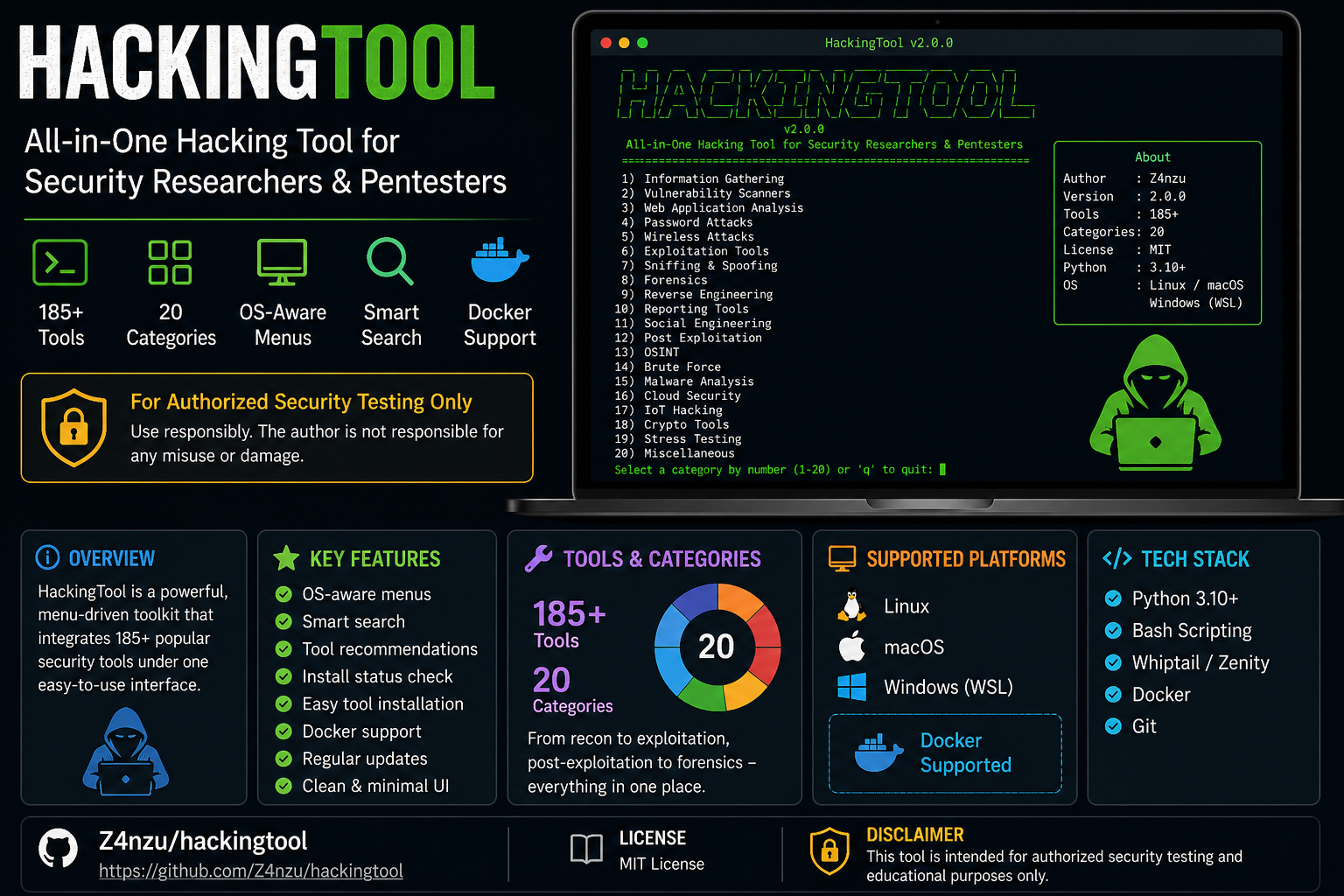
Z4nzu's HackingTool is a Python-based terminal application that serves as an all-in-one catalog and launcher for over 185 security tools, organized into 20 categories. The v2.0.0 release includes modernized features like search, tag filtering, Docker support, and enhanced usability.
Subheadline
Z4nzu’s HackingTool is a Python-based terminal project that organizes more than 185 third-party security tools across 20 categories, with v2.0.0 adding Python 3.10+, search, tag filtering, OS-aware menus, install-status checks, Docker support, and new Active Directory, cloud, and mobile security categories.
Lead
HackingTool is not a new scanner, exploit framework, or vulnerability engine by itself. It is better understood as a terminal-based catalog and launcher for many existing security tools.
The GitHub repository, maintained under Z4nzu/hackingtool, describes the project as an “All-in-One Hacking Tool for Security Researchers & Pentesters.” Its README presents a broad menu of tooling for reconnaissance, web security testing, forensics, reverse engineering, Active Directory assessment, cloud security, mobile security, and other security workflows.
That breadth is also the project’s biggest concern. The repository includes legitimate defensive and assessment tooling, but it also lists categories such as phishing, DDoS, RAT, payload creation, and post-exploitation. The project itself includes a notice that it is for authorized security testing only.
At a Glance
- Project: HackingTool
- Repository: Z4nzu/hackingtool
- Owner / maintainer identity shown by repo: Z4nzu
- Primary purpose: All-in-one terminal launcher and organizer for security researchers and pentesters
- Current README version label: v2.0.0
- Language profile shown on GitHub: Python 95.3%, Shell 4.0%, Dockerfile 0.7%
- License: MIT License
- Scale shown on GitHub page: about 64,000+ stars and 7,000+ forks at the time checked
- Safety framing: The README states the project is for authorized security testing only
What Happened
The most important recent project signal is the v2.0.0 restructuring described in the README. The update modernizes HackingTool around Python 3.10+, removes Python 2-era code according to the project’s own notes, and adds quality-of-life features that make the menu system more usable.
The README highlights several v2.0.0 changes:
- Python 3.10+ requirement
- OS-aware menus that hide Linux-only tools automatically on macOS
- 185+ tools, with 35 new modern tools added across six categories
- Search by name, description, or keyword
- Tag filtering across 19 tags, including examples such as OSINT, web, C2, cloud, and mobile
- Recommendation mode where users describe a task and the tool shows matching options
- Install-status indicators
- “Install all” option for a category
- Smart update behavior for tools
- Local Docker builds rather than relying on unverified external images
- Three added categories: Active Directory, Cloud Security, and Mobile Security
The project therefore appears to be moving from a large static menu of security scripts toward a more structured terminal interface for managing security tooling.
Key Facts / Comparison
| Area | Source-supported detail |
|---|---|
| Project type | Terminal-based all-in-one hacking/security-tool launcher and catalog |
| Target users | Security researchers and pentesters |
| Version label in README | v2.0.0 |
| Tool scale | 185+ tools across 20 categories |
| Major interface features | Search, tag filter, recommendation mode, install-status display, quick help |
| Platform direction | Linux/Kali/Parrot/macOS are presented in README badges; OS-aware menus hide Linux-only tools on macOS |
| Deployment options | One-liner installer, manual install, and Docker/Compose paths are documented |
| Core dependencies | Python 3.10+ for core; Go, Ruby, and Docker are listed for specific tool families |
| License | MIT License |
| Usage warning | README says it is for authorized security testing only |
Background and Context
Security teams often rely on dozens of separate tools: network scanners, web fuzzers, OSINT utilities, secret scanners, directory brute-forcers, mobile testing frameworks, forensic tools, and cloud audit utilities. HackingTool tries to reduce that operational sprawl by grouping tools into a terminal menu.
The project’s categories show the intended scope. The README lists Information Gathering, Wordlist Generator, Wireless Attack, SQL Injection, Phishing Attack, Web Attack, Post Exploitation, Forensics, Payload Creation, Exploit Framework, Reverse Engineering, DDoS Attack, RAT, XSS Attack, Steganography, Active Directory, Cloud Security, Mobile Security, and Other Tools.
That makes HackingTool closer to a curated toolbox manager than a single technical framework. It delegates actual scanning, auditing, exploitation, or analysis work to the underlying tools it installs or launches.
Why This Matters
For legitimate security work, tool discovery and environment setup can consume a surprising amount of time. A menu-driven launcher can help students, CTF participants, and authorized testers find commonly used tools faster.
The v2.0.0 additions matter because they address practical friction:
- Search reduces the need to remember where a tool is nested.
- Tags help users filter by task area.
- Install-status indicators clarify whether a tool is ready.
- OS-aware menus reduce platform mismatch.
- Docker support provides a more contained way to build and run the environment.
- The addition of Active Directory, cloud, and mobile categories reflects areas that are increasingly central to modern security testing.
The project’s popularity also shows continuing demand for consolidated security workbenches, especially among learners and practitioners who want a single entry point into a large tool ecosystem.
Insight and Industry Analysis
HackingTool’s strongest value is organization. It is not competing with Nmap, Amass, Nuclei, Trivy, Frida, BloodHound, Ghidra, or other specialist tools. Instead, it attempts to sit one layer above them, acting as a menu, installer, launcher, and reference point.
That design has a clear advantage: it can incorporate best-of-breed tools without rebuilding their functionality. But it also inherits the complexity, maintenance burden, safety issues, platform assumptions, and legal boundaries of every tool it references.
The addition of “recommend” and tag filtering is particularly interesting. It suggests HackingTool is trying to become more task-oriented: rather than asking users to know exact tool names, the interface can map a user’s intent to relevant tools. If implemented carefully, that could make the project more usable for training and authorized lab work.
However, the project’s dual-use surface is significant. Any platform that groups phishing kits, DDoS scripts, RAT-related tooling, payload creation, post-exploitation utilities, and reconnaissance tools needs strong ethical framing, permission boundaries, and user education. The README’s authorized-testing notice is important, but the project’s usefulness depends heavily on how and where it is used.
Strengths, Limitations, and Open Questions
Strengths
- Broad coverage: The README lists 20 categories and 185+ tools.
- Modernized runtime: v2.0.0 moves the project to Python 3.10+.
- Improved navigation: Search, tags, recommendation mode, and quick commands make the terminal UI more approachable.
- Practical installation awareness: Install-status checks and smart update behavior address common setup pain points.
- Container option: Docker support gives users another way to run the environment.
- Permissive license: The repository uses the MIT License.
Limitations
- Not a unified security engine: It is mainly a launcher and organizer, not a single integrated scanner or analysis platform.
- Dependency complexity: Many listed tools have their own dependencies, update cycles, legal constraints, and platform limitations.
- Potentially risky categories: Phishing, DDoS, RAT, payload, and post-exploitation categories make the project highly dual-use.
- Quality depends on third-party tools: The project’s practical value depends on whether linked tools remain maintained, safe, and compatible.
- Documentation depth varies: The README provides broad coverage, but the source does not specify detailed governance, validation, or security review practices for every bundled or linked tool.
Open Questions
- How consistently are third-party tools reviewed before being added?
- Are archived, abandoned, or unsafe tools clearly separated in the live menu?
- How does the project verify install commands or reduce supply-chain risk?
- Will the recommendation feature evolve into a safer guided workflow for authorized environments?
- Can the project provide stronger lab-only, CTF-only, or defensive-use guardrails for sensitive categories?
Technical Deep Dive
At a technical level, HackingTool appears to be built as a Python terminal application with a shared core class for tool entries. The repository’s core.py defines a HackingTool class with metadata fields such as title, description, install commands, run commands, project URL, supported operating systems, root requirement, language/runtime requirements, tags, and archived-tool flags.
The same core file also shows the terminal interface using Rich components such as panels, tables, prompts, themes, and formatted tracebacks. Its menu model exposes standard actions including install, run, update, and open folder. The update logic attempts to detect common installation patterns, including Git, pip, Go, and Ruby gem workflows.
This architecture explains the project’s role: individual tools are represented as menu entries with metadata and commands, while the core runtime provides shared display, navigation, installation, update, and status behavior.
The README lists several dependency layers:
- Python 3.10+ for the core application
- Go 1.21+ for tools such as nuclei, ffuf, amass, httpx, katana, dalfox, gobuster, and subfinder
- Ruby for tools such as haiti and evil-winrm
- Docker for selected optional tools such as Mythic and MobSF
This means HackingTool is not just a Python package. It is a cross-runtime orchestration layer for tools written in different languages and distributed through different ecosystems.
What to Watch Next
The most important thing to watch is whether HackingTool can maintain quality as the tool list grows. A large security launcher is only as trustworthy as its curation process.
Key areas to monitor include:
- Whether v2.0.0 becomes a stable baseline
- How quickly tool definitions are updated when upstream projects change
- Whether archived or abandoned tools are separated clearly
- How the project handles supply-chain concerns around installation commands
- Whether sensitive categories receive stronger warnings or defensive-use guidance
- Whether the recommendation feature becomes a genuinely useful workflow layer
Conclusion
HackingTool is best described as a large, menu-driven security toolbox manager for authorized security researchers and pentesters. Its v2.0.0 refresh gives the project a more modern foundation: Python 3.10+, search, tags, recommendation mode, install-status checks, smarter updates, Docker support, and additional categories for Active Directory, cloud, and mobile security.
Its appeal is obvious: security tooling is fragmented, and HackingTool gives users a single place to discover and launch many tools. But its risks are equally clear. Because it includes sensitive dual-use categories, the project should be treated as a controlled lab and authorized-assessment utility, not a general-purpose hacking shortcut.
The project’s future value will depend less on the number of tools it lists and more on curation, maintenance, safety boundaries, and whether it can help users choose the right tool responsibly.